Intoduction
As all we know there is no support for accelerometer in Windows Phone 7 Emulator. Of course there are projects which are using some hardware such as Wii or XBox 360 controller to emulate mobile device movement. They have one weak point – they needs hardware. Some day, when I had more free time I decided do find some solution for this. After couple of hours I have found one and this is it… I want you to introduce MaciejGrabek.WP7AccelerometerEmulator.
How it works?
Solution consists of three projects:
1. MaciejGrabek.WP7Accelerometer – which is core library to use in your projects. It contains WP7AccelerometerProvider class which provides all functionality given by real Accelerometer from Microsoft.Devices.Sensors ie Start and Stop methods and ReadingChanged event which provides information about gravity for each axis.
2. MaciejGrabek.WP7AccelerometerEmulatorUI – this project allows you to emulate position of phone by simple use of three scrolls for X, Y and Z rotation. It sends all required data to Proxy.
3. MaciejGrabek.WP7AccelerometerEmulatorProxy – this proxy is used to receive data from UI and allows to read it from WP7AccelerometerProvider.
If you running your application on emulator then WP7AccelerometerProvider is trying to read data from Proxy – if something goes wrong on retrieving this data (ex proxy is unavailable) it simply switches into random data mode. You can retry receiving by Stop and Start methods.
How to use it?
It is very simple – like using real accelerometer.
When you create WP7 application first thing what you need to do is adding reference to MaciejGrabek.WP7Accelerometer library (or project). Then create accelerometer object like below:
1 | var acc = new WP7AccelerometerProvider(); |
Now simply add handling to AccelerometerProviderReadingChanged event:
1 2 3 4 5 6 7 | acc.ReadingChanged += OnAccelerometerProviderReadingChanged; private void OnAccelerometerProviderReadingChanged(object sender, WP7AccelerometerReadingEventArgs args) { //do what you want with data ProcessAccelerometerData(args.X, args.Y, args.Z, args.Timestamp); } |
Start WP7AccelerometerProvider and do what you want with received data.
1 2 3 4 5 6 7 8 | try { acc.Start(); } catch (Exception exc) { txtblk.Text = exc.Message; } |
This is all you need to do in application. Now lets see control panel. To do this you need to start MaciejGrabek.WP7AccelerometerEmulatorUI and MaciejGrabek.WP7AccelerometerEmulatorProxy (it should start automatically with MaciejGrabek.WP7AccelerometerEmulatorUI, but if not be sure to do this manually – otherwise you will get random data). Run your WP7 application on emulator and on MaciejGrabek.WP7AccelerometerEmulatorUI mark “Send data to emulator” checkbox and have fun! Result is shown below:
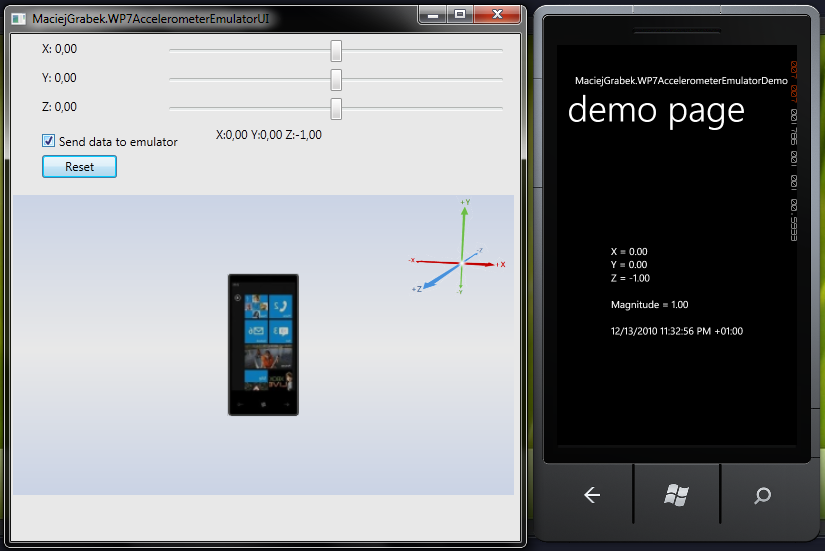
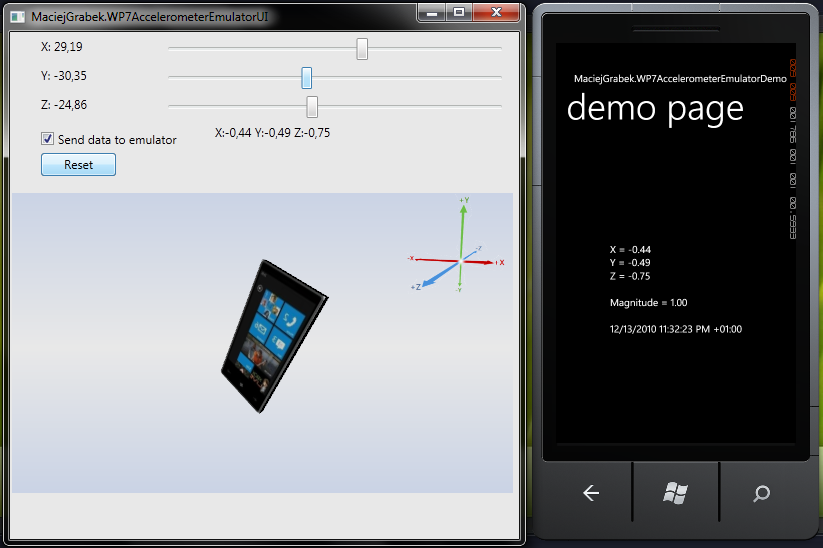
As you can see it is very simple and intuitive to use.
Where to find it?
You can simply download MaciejGrabek.WP7AccelerometerEmulator and use it in your projects. There is of course some demo to see exactly how to use it.
What will appear in future versions?
1. Sometimes You can see Gimbal Lock effect – I am currently trying to solve it
2. Add mouse control for rotation
3. Add movement sequences (you can record movement like shaking, rolling etc, save it, and quick run every time you need)
4. Add additional acceleration for movement (shake etc)
Fell free to comment!